SC220 LIVE • FREE TO TRY
Make karaoke and live audio easier to enjoy.
SC220 Live brings your audio interface and PC audio into one clear Windows console. Recording Tech SC220 is the most tested path, but other interfaces are welcome to try it too. Balance the levels, shape the sound, watch the meters, then send the final mix to OBS or TikTok Live Studio.
365 days full control No credit card Windows 10/11 x64
SC220 only? Android? SmartScreen? The common questions are answered below.
SC220 Live Console READY
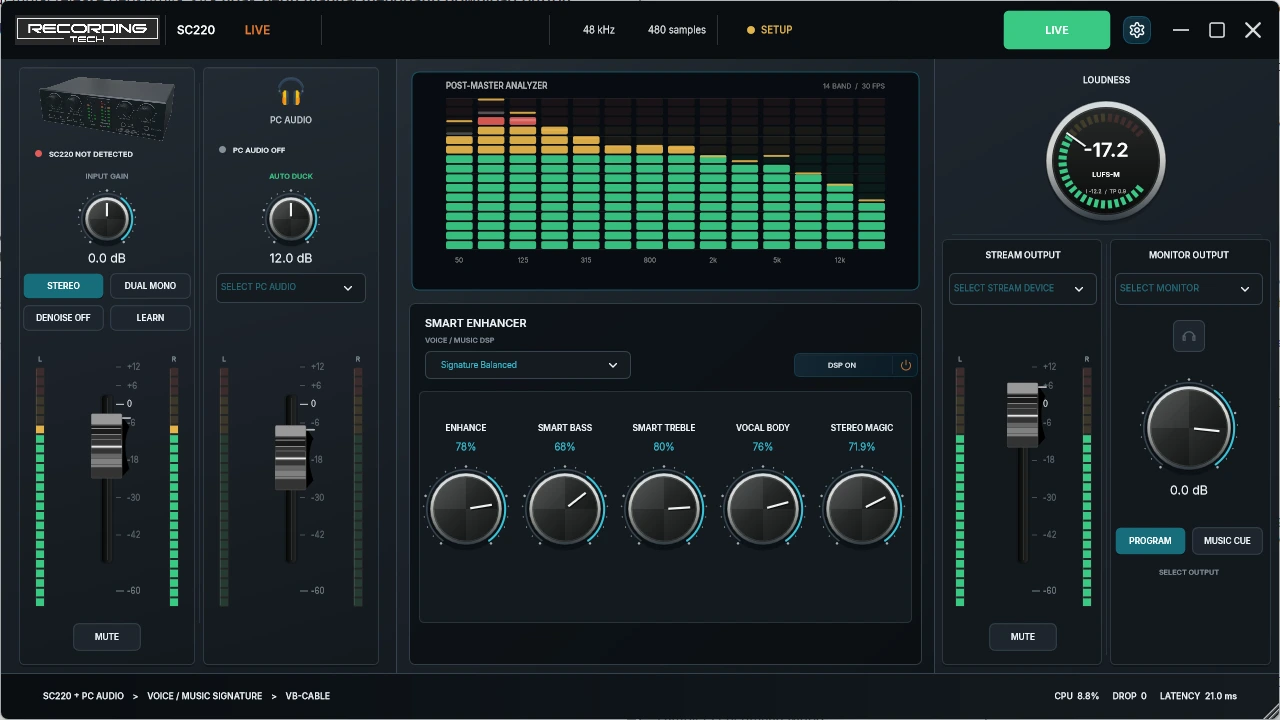
Native Windows appInterface + PC audioOBS / TikTok ready
HOW IT WORKS
From sound coming in to going live, the order stays simple.
Choose the sources, balance the sound, check the level, then send the final mix to your live app.
Interface + PC audio
Select your audio interface and the Windows music or playback source you want to mix.
Get voice and music comfortable
Set the levels, then use ASK-P Signature when you want a little more character.
Watch the meters before live
The meters help you see programme level and peaks before the audience hears them.
OBS / TikTok Live
Choose the stream output, then select the matching endpoint in your live app.
WHAT IT DOES
The things you use most are easy to find.
Pick what you want to see. The explanation and the image always talk about the same thing.
VOICE + MUSIC
Your interface and PC audio stay separate, so they are easy to balance.
You always know which fader belongs to the interface and which one controls PC audio.
- Clear faders and meters for each source
- Independent voice and music balance
- One final mix for the broadcast app
INTERFACE + PC AUDIOVOICE & CHARACTER
Want it warmer, brighter, or wider? Use the main sound controls.
ASK-P Signature keeps the creative controls focused instead of turning them into a maze of DSP parameters.
- Enhance, Smart Bass, Smart Treble, Vocal Body, Stereo Magic
- Fast adjustments for karaoke and live
- Easy to return to a sensible starting point
ASK-P SIGNATURELEVEL & PEAK
Before going live, check that the level looks healthy.
Loudness and peak meters give you a quick visual reference before audio reaches the audience.
- Easy-to-see stereo peaks
- Programme-level feedback
- Check first, then go live
LOUDNESS + PEAKWINDOWS ROUTING
Recognize the device names when you move into OBS or TikTok.
SC220 Live shows Windows endpoints so sources and outputs are easier to match.
- Real Windows endpoint names
- Easier source and output matching
- Works well with VB-CABLE workflows
WINDOWS ENDPOINTSBEFORE INSTALLING
SmartScreen appeared? That can happen.
Windows can warn about software that is new or not yet widely downloaded. Do not ignore a warning blindly—download from this official page and compare the SHA-256 when you want extra confidence.
The button points to the official project release asset.
Make sure it matches the stable release shown here.
The official hash is available in the download section.
Continue only when the source and file match.
What does the SmartScreen warning mean?
SmartScreen uses app and publisher reputation as one of its signals. A warning does not prove that a file is malicious or safe, so the official source and file verification still matter.
QUESTIONS PEOPLE ACTUALLY ASK
Wondering the same thing? Here are the straight answers.
These are based on real questions from people considering SC220 Live—not generic marketing FAQ.
Is SC220 Live only for the Recording Tech SC220?
No. SC220 is the most tested and documented path, but other audio interfaces can be tried as long as they appear as usable Windows audio endpoints and the routing fits your setup.
Is there an Android or phone version?
Not yet. The current official SC220 Live release is for Windows 10/11 x64. Do not assume an APK using the SC220 Live name is an official release from this site.
Can I sing with StarMaker, WeSing, or Smule?
SC220 Live runs on Windows, so phone karaoke apps are not connected directly. Audio has to be routed from the PC or interface into the phone. For example, a Maono PS22 can be used when its virtual matrix is configured correctly. The final result depends on your hardware routing.
Windows says virus, SmartScreen appears, or the installer errors. What should I do?
Start from the official download button, then compare the version and SHA-256. Do not disable antivirus just to force the installation. If the hash differs, delete the file and download it again. If the hash matches but installation still fails, keep a screenshot of the exact error for troubleshooting.
Should the mic plug into the PC or the mixer / audio interface?
Usually the mic goes into the audio interface, mixer, or karaoke processor input, not the PC analog mic jack. That hardware then connects to Windows. If the sound is disappointing, check gain staging, input type, hardware levels, and routing before blaming the DSP.
If software can do this, does expensive hardware become unnecessary?
No. SC220 Live does not replace a microphone, preamp, ADC/DAC, audio interface, mixer, or karaoke processor. It helps with mixing, DSP, metering, and routing inside Windows. Good hardware still matters for input and output quality.
Why is my installer version or file size different from an older video?
Because SC220 Live keeps being updated. Use the stable version shown on this page, not the version number from an older video. The version, release date, and SHA-256 here follow the current stable release.
Do I have to use OBS?
No. OBS is only one example. Other Windows apps that can receive the selected audio endpoint can also be used, including TikTok Live Studio workflows.
Still stuck? Use the hardware guide and release pages below for more technical troubleshooting.
SIMPLE SETUP
Four steps, then you can start trying it.
Install it, choose your sources, choose the output, then connect your live app.
Download installer- 01
Download and install
Use the official installer. If SmartScreen appears, verify the source and SHA-256 before continuing.
- 02
Choose your audio interface and PC audio
Select the interface you use and the Windows playback source carrying music or PC audio.
- 03
Choose Stream Output
Use CABLE Input as the final mix destination when your workflow uses VB-CABLE.
- 04
Connect the live app
In OBS or TikTok Live Studio, choose CABLE Output or the matching endpoint.
CLEAR LICENSING
Try full control for 365 days. No credit card.
You can explore the full workflow without payment details and without automatic billing when the full-control period ends.
AFTER 365 DAYS
Core audio functions keep working
Routing, faders, meters, mute, and ducking remain active. Selected creative controls become read-only.
OFFICIAL DOWNLOAD
Ready to try it? Start with the official installer.
Download the latest Windows x64 release. Version, publication date, and SHA-256 are shown next to the button.
365 days full controlNo credit cardSHA-256 available
Versionv0.1.2
PlatformWindows x64
PublishedAugust 14, 2026
SHA-256
ba6c61617d8c796dd953234e50f6d2e179c5efbe5e281892da7e7ba977e55693BEFORE DOWNLOADING
What to prepare.
- OSWindows 10 or 11, 64-bit
- HardwareSC220 is the most tested; other audio interfaces can be tried
- RoutingVB-Audio VB-CABLE when your workflow needs it
- BroadcastOBS, TikTok Live Studio, or another compatible app
TECHNICAL QUESTIONS
A few things worth knowing.
Is SC220 Live really free to try?
Yes. Full control is available for 365 days without a credit card or automatic billing. After that, core audio functions remain available while selected creative controls become read-only.
What does VB-CABLE do?
VB-CABLE can carry the final SC220 Live mix into another app as a virtual audio endpoint. Not every workflow has to be identical, so match it to your hardware routing.
Is SC220 Live a karaoke song player?
No. SC220 Live handles mixing, DSP, metering, and routing in Windows. It does not manage a song catalogue or display lyrics.
Need help setting up an SC220 MKII?
See wiring, gain staging, Windows endpoints, drivers, and troubleshooting checks.
Open SC220 MKII guideLooking for KTV Pro K500 information?
There is a separate page so the karaoke processor role does not get mixed up with SC220 Live.
Open KTV K500 guide